
PalmAgent ONE
PalmAgentFinance
3.431.00 Reviews
- Version
- 4.8.5.1.6
- Installs
- 10.00K
- Age Rating
- Everyone
Screenshots
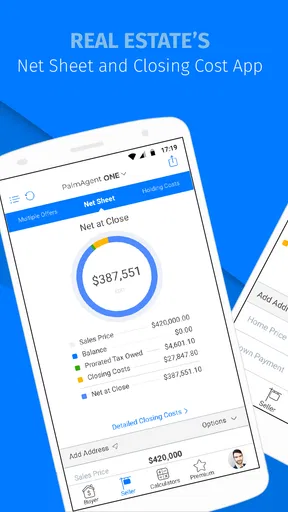
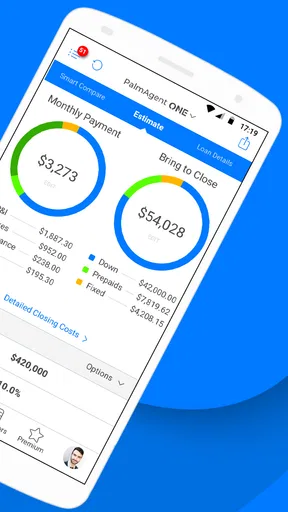
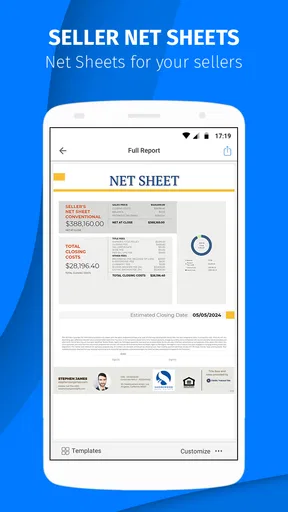


Our Review of PalmAgent ONE
 Analysis by Appyee
When I look at a finance app for real estate work, I care less about a polished first impression and more about whether it remains understandable during a busy day. PalmAgent ONE is aimed at real estate professionals, and that focus makes it more specialized than a general budgeting or banking app. I found its main appeal in having a tool built around property-related work rather than asking a salesperson or agent to adapt a personal finance app to a professional routine.
The app comes from PalmAgent, and it is free to install, with optional in-app purchases ranging from under a dollar to just under ten dollars per item. It is rated for Everyone, which makes the intended audience broad from an age perspective, although the professional subject matter is clearly more relevant to adults working with real estate transactions. Its average rating sits at 3.4 from over sixty ratings, so I would approach it with realistic expectations: useful for the right workflow, but not a universally praised all-in-one solution.
How PalmAgent ONE works in a real working day
I use PalmAgent ONE as a prompt to think through the working routine around a property conversation, not just the moment when I open a finance app. Preparing the relevant information before an appointment can make it easier to explain figures without turning the client discussion into a search through screens. The next section looks at how that preparation can shape a smoother, more deliberate day.
Readability and navigation matter more than decoration
My first test with a specialized finance app is simple: can I understand what I am looking at without stopping to decode the screen? PalmAgent ONE is best considered a focused work tool, not a casual app that you open for entertainment. That distinction affects how I would use it. A real estate professional usually needs to move from a property conversation to figures, transaction details, or client-facing information without losing the thread of the appointment.
The strongest reason to choose a dedicated tool like this is context. A conventional calculator can handle arithmetic, and a notes app can store figures, but neither is shaped around the language and decisions of property work. A general spreadsheet offers flexibility, yet it also asks the user to build and maintain the structure. PalmAgent ONE is more appealing when the goal is to keep a real estate task inside a purpose-built environment instead of assembling several unrelated apps.
That focus can also create friction. Specialized screens often make sense to people who already understand the workflow, while a new user may need time to learn where each task belongs. I would not recommend opening it for the first time in front of a client and expecting immediate confidence. A short practice session is worthwhile, especially if the user has different levels of comfort with financial terminology or mobile interfaces.
For readability, I would use the app on a device with a screen large enough for the information being reviewed. A phone may be convenient while moving between appointments, but a larger display is generally easier when several figures or details need to be compared. This is not a claim about a particular screen layout; it is practical advice for reducing visual strain in any finance workflow where accuracy matters.
One useful habit is to separate preparation from presentation. Before a meeting, I would open the app, check the relevant information, and make sure I understand the result. During the conversation, I would use it as a reference rather than exploring every option live. That small change makes the experience less stressful for both the professional and the client, particularly when the client is unfamiliar with property finance.
Helpful for professionals, less so for casual money management
The app’s professional focus is also its clearest boundary. If I wanted to track groceries, monitor a personal bank account, split household bills, or build a long-term personal budget, this would not be my first choice. A banking app, budgeting app, or spreadsheet would usually be more appropriate because those tools are designed around personal money habits.
PalmAgent ONE makes more sense for an agent, broker, or other real estate worker who needs property-related financial information close at hand. It can be especially useful when the alternative is carrying printed worksheets, switching between several apps, or relying on memory during a conversation. The benefit is not that it replaces every financial tool; the benefit is that it may reduce the number of disconnected steps in a real estate task.
I would also be careful about treating it as a complete transaction-management system. The description positions it as an app for real estate professionals, but that does not automatically make it a replacement for every document, communication, accounting, or compliance tool used by a real estate business. A professional should still keep the broader workflow organized elsewhere when a task requires formal records, collaboration, or office-specific procedures.
Motor and sensory considerations during property work
Accessibility is not only about whether an app can be opened. In practice, it is also about whether someone can use it comfortably while standing at a showing, holding a phone in one hand, working in bright daylight, or dealing with interruptions. PalmAgent ONE is more approachable when the user can prepare the workflow in advance and avoid unnecessary tapping while speaking with a client.
For users with limited dexterity, the best approach is to reduce repeated entry. I would prepare the information before travelling, keep the device stable on a desk or counter when possible, and avoid trying to complete a detailed task while walking between rooms. These habits do not change the app itself, but they can make a specialized finance workflow more manageable.
Users with visual sensitivities may prefer a larger device, a comfortable brightness level, and a quiet moment for checking figures. Finance information deserves deliberate reading, so I would not rely on a quick glance in a dim car or under harsh outdoor light. If someone needs large text, strong contrast, screen-reader compatibility, or another specific accessibility behavior, I would test the current app version directly on their device before depending on it professionally.
That testing step is important because the experience can vary with operating-system settings, display size, and assistive technology. PalmAgent ONE supports devices running Android 7.0 or later, which covers older Android hardware as well as newer phones, but compatibility alone does not tell me how comfortable every user will find the interface. A person who depends on a particular accessibility setup should make the app part of a low-pressure trial rather than assuming that a broad age rating guarantees an equally easy experience for everyone.
There is also a sensory side to client meetings. Some people process numbers slowly, become overwhelmed by dense information, or prefer to hear an explanation rather than study a screen. I would use the app as a support for conversation, not as the conversation itself. Reading out a result in plain language, pausing for questions, and offering a written follow-up can make the experience more inclusive than simply turning the phone toward someone.
A realistic scenario: preparing for a property appointment
Imagine I am heading to a property appointment where a client wants to understand the financial side of a possible purchase. Before leaving, I would gather the relevant details, open PalmAgent ONE, and review the figures in a quiet setting. I would note which parts need explanation and which questions may require information from another professional or system.
At the appointment, I would avoid presenting a stream of unexplained numbers. Instead, I would use the app to support one point at a time, checking that the client understands the meaning before moving on. If the client has difficulty reading a small screen, I would enlarge the display where possible or explain the result verbally. If the meeting becomes rushed, I would stop rather than make a hurried entry that could lead to confusion later.
Afterward, I would treat the app as one part of the process. I would record the agreed next steps using the office’s normal method and avoid assuming that a figure viewed on the phone is automatically a complete record of the appointment. This workflow shows where the app can help: it can keep a professional close to relevant financial information while the conversation is happening. It also shows why it should not be the only safeguard against mistakes.
A second useful scenario is a professional who works across several locations and does not want to carry a laptop for every preliminary discussion. A mobile tool can be convenient during early conversations, especially when the goal is to explore possibilities rather than finalize paperwork. The trade-off is that mobile convenience can encourage rushed decisions, so I would use it for orientation and discussion, then move important work into the formal process used by the business.
Situational access: where the mobile format helps
The mobile format is valuable when the user is away from a desk. Real estate work often involves travel, property visits, open-house activity, and conversations that do not happen in a traditional office. Having a specialized finance app on a compatible Android device can be more practical than waiting to return to a computer for every preliminary calculation or review.
It can also help a professional who prefers a consistent tool rather than switching between a calculator, a spreadsheet, and handwritten notes. The less copying required, the lower the chance of transposing a figure between apps. I would still verify important results, but keeping related work closer together is a sensible reason to consider this app.
Older hardware may be another advantage. Because the minimum operating system is Android 7.0, someone with an older compatible phone may be able to use it without immediately replacing the device. That can matter for a small business or an individual professional who wants to control equipment costs. The practical experience will still depend on the phone’s condition, display, speed, and available storage.
The current version is 4.8.5.1.6, so I would check that the installed version matches the one available for the user’s device before building a routine around it. I would also test it after an update rather than assuming that a familiar workflow will feel identical forever. That is particularly important for users who rely on a specific font setting, navigation habit, or assistive configuration.
Its free price makes experimentation easier. A professional can try it without committing to a purchase at the outset, then decide whether optional purchases are worthwhile for their particular needs. I would not buy add-ons simply because they are available. First, I would identify the exact task I need to improve and confirm that the purchase supports that task. For a person who only needs occasional property-related calculations, paying for extras may not offer enough value.
Remaining barriers and sensible workarounds
The first barrier is audience fit. The app is not designed around ordinary personal finance, so someone searching for banking, debt reduction, investment tracking, or household budgeting may feel that it is too specialized. Choosing it because it is free would not solve that mismatch. The better option for those needs is a tool built around personal money management.
The second barrier is confidence. An average rating of 3.4 suggests a mixed reception rather than a clear recommendation from nearly every user. I would interpret that as a reason to test the app against a real work task, not as proof that it is poor. A professional should ask whether it handles the specific routine they repeat each week, whether the interface feels understandable, and whether it fits the office’s existing process.
The third barrier is dependence on mobile conditions. A phone can be lost, damaged, low on battery, or difficult to read in a particular environment. Anyone using PalmAgent ONE for important work should maintain a sensible backup approach and avoid making the app the sole location for information that must be preserved. This is especially relevant when a client meeting involves several people with different communication or access needs.
Optional purchases are another point to consider. The available items range from $0.99 to $9.99 each, so the app may remain inexpensive for light use, but costs can accumulate if a professional keeps adding extras without a clear plan. I would treat the free installation as a trial opportunity, then review the value of each purchase separately. A small business should also decide in advance who is allowed to buy items and how those expenses will be tracked.
Privacy and professional responsibility should shape the workflow as well. I would avoid entering sensitive client information casually, especially on a shared device or in a public place, and I would follow the brokerage’s own rules for storing and communicating financial details. The app can support a professional task, but it does not remove the need for careful handling of client information or accurate record keeping.
For users with different abilities, the most reliable workaround is preparation. Create a calm setup, use the largest comfortable display, adjust the device’s accessibility settings, and allow extra time for reading or explaining figures. If the app does not fit a person’s preferred input method, a desktop workflow, a spreadsheet with customized formatting, or a colleague-assisted process may be more inclusive. The right choice is the one that preserves accuracy and independence rather than forcing everyone into the same interface.
Who should use it, and who should skip it?
I would recommend trying PalmAgent ONE if you work in real estate and regularly need a mobile, property-focused finance tool during early discussions, appointments, or travel. It is particularly sensible for someone who wants to reduce the gap between a client question and a useful financial explanation, without carrying a full computer everywhere.
I would be more cautious if you need a complete business system. If your daily work depends on extensive collaboration, formal document storage, detailed accounting, or a highly customized reporting process, this app may be only one small piece of the solution. In that situation, a broader professional platform may be better, with PalmAgent ONE used only if it fills a specific mobile gap.
I would skip it for personal budgeting unless its real estate orientation directly matches your needs. A general finance app will usually be easier for tracking household spending, recurring bills, and personal goals. I would also skip it if you cannot test the interface comfortably with your preferred accessibility settings. A free app is not a bargain if it makes important work slower, harder to read, or more error-prone.
Its audience size gives some useful context: PalmAgent ONE has passed ten thousand installs, while its rating count remains relatively modest. I see that as a niche tool with an established presence, not as evidence that it is the default choice for every real estate professional. The app deserves a practical trial based on your own workflow rather than a decision based only on popularity.
My inclusive verdict
After looking at it as both a finance tool and a mobile work aid, I see PalmAgent ONE as a focused option for real estate professionals who value property-specific support away from the desk. Its free entry point, broad age rating, and support for Android 7.0 or later make it approachable to test, while the optional purchases mean users should decide carefully which extras genuinely improve their work.
Its inclusive value depends heavily on context. Someone who can prepare information, use a comfortable screen, and work at a measured pace may find it useful during property conversations. Someone who needs highly customized accessibility behavior, extensive records, or a personal budgeting system may be better served by another tool or by using this app alongside a more flexible alternative.
My practical recommendation is to install it, recreate one ordinary real estate task, and judge the complete experience: finding the right information, reading the result, explaining it to another person, and preserving the next step. If that sequence feels clear and manageable, PalmAgent ONE could earn a place in your mobile kit. If the process creates more uncertainty than it removes, a spreadsheet, desktop platform, or broader professional solution is the better choice.
In short, I would recommend it selectively rather than universally. Its real strength is focused mobile support for property-related financial conversations, not a promise to replace every finance or business app. That honest distinction is what makes the app worth trying for the right professional—and easy to pass over for everyone else.
Verdict
Strengths of PalmAgent ONE
- Quick access to property listings, updates, and agent information in one app.
- Useful mobile tools help PalmAgent users stay connected while away from the office.
- Centralized communication can reduce delays between agents, clients, and teams.
- The interface is designed for practical, frequent use rather than entertainment.
- Convenient for checking work-related information without opening a desktop browser.
Limitations of PalmAgent ONE
- Most features may be unavailable without PalmAgent account credentials.
- The app’s usefulness depends heavily on your brokerage’s PalmAgent setup.
- Some functions may feel limited compared with a full desktop platform.
- Frequent notifications could become distracting during busy working hours.
- Performance and available tools may vary between Android and iOS devices.
Other Releases by PalmAgent
View All
FidelityAgent ONE
Finance4.2

TicorAgent ONE
Finance4.4

LawyersAgent ONE
Finance4.1

ChicagoAgent ONE
Finance4.2
Similar Picks in This Category
View All
Google Wallet
Google LLC4.3

Airtel: Recharge, Bank & Loans
Airtel4.0

PayPal - Pay, Send, Save
PayPal Mobile4.2

DANA Indonesia Digital Wallet
PT Espay Debit Indonesia Koe4.5

Binance: Buy Bitcoin & Crypto
Binance Inc.4.8

Cash App
Block, Inc.4.7
Frequently Asked Questions
What is PalmAgent ONE used for?
PalmAgent ONE is a mobile tool designed primarily for insurance professionals, agents, and related users who need convenient access to agency information while away from a desktop computer. Depending on the organization’s setup, it may help users review customer or policy details, manage tasks, communicate with clients, and access important insurance resources. Available features can vary by company and user permissions.
Who can use PalmAgent ONE, and is an account required?
PalmAgent ONE is generally intended for authorized insurance agency users rather than casual consumers. In most cases, you need an account or login credentials provided by your employer, agency, or participating organization before you can use the application. Simply downloading the app may not be enough to access its functions. Contact your agency administrator if you are unsure whether your organization supports the platform.
Is PalmAgent ONE free to download and use?
The application may be available to download without an upfront charge, but access and usage can depend on a subscription, agency agreement, or employer-provided account. Some features may also require your organization to maintain an active PalmAgent service. Because pricing and access arrangements can differ, users should confirm the terms with their agency or administrator instead of assuming that every feature is free.
What information and permissions does PalmAgent ONE require?
As an insurance-related business application, PalmAgent ONE may handle sensitive agency, customer, policy, or communication data. It can require an internet connection and may request permissions such as notifications, storage, camera access, or device authentication, depending on the features enabled by your organization. Review the permission prompts carefully, keep your login private, and use the app only on a secure device.
What should I do if PalmAgent ONE does not work or I cannot log in?
If you cannot sign in, first verify your username, password, internet connection, and whether your account is still active. Updating the app, restarting your device, or reinstalling it may resolve basic technical problems, although you should avoid deleting the app if you are unsure whether unsynchronized information is stored locally. For account, agency configuration, or permission issues, contact your administrator or PalmAgent support.
